
Enhance WhatsApp with Real-Time Tracking & Night Mode
Overview
The software enhances the WhatsApp Web™ experience through a suite of productivity-focused features designed for users who rely heavily on messaging for personal or professional communication. It operates as a browser extension, integrating directly into Chrome to provide real-time tracking of contacts’ online status, unread message counters, and customizable notifications. The tool is particularly useful for individuals managing multiple conversations, such as freelancers, small business owners, or remote team coordinators who need to stay responsive without constant manual checks.
By leveraging native WhatsApp Web™ events, the extension functions without relying on third-party APIs, ensuring that all data remains local and secure. This makes it an appealing choice for privacy-conscious users who want advanced functionality without compromising data integrity. The extension runs in the background, continuously updating counters and tracking status, even when no Chrome window is open. It is compatible with Windows, Mac, and Linux systems, offering broad accessibility across major desktop platforms.
The developer, GOD MODE FOR WHATSAPP™, has not provided additional details about their background or prior projects. However, the software’s design and functionality suggest a focus on utility, efficiency, and user-centric innovation. Real-world usage scenarios include monitoring client availability during business hours, staying informed about team members’ online presence, or managing personal communication streams with minimal distraction.
Key Features & Capabilities
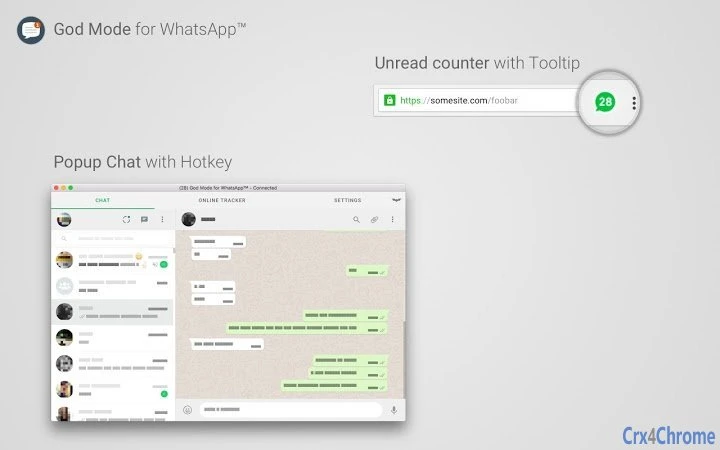
- Extension Icon with Unread Message Counter – Displays the number of unread messages from tracked contacts directly on the browser icon, enabling quick status checks without opening WhatsApp.
- Online Status Tracker – Monitors the online status of selected contacts using native WhatsApp Web™ events, even if the user is not in their contact list or privacy settings restrict visibility.
- Optional Notifications – Provides real-time alerts when a tracked contact comes online, configurable to suit individual workflow preferences.
- Popup Mode – Allows users to open or focus WhatsApp in a popup window with a single click, or use a pinned tab for persistent access. A customizable hotkey (default: Alt+1) enables rapid access.
- Background Mode – Continues running in the background to update counters and track status, supporting notifications even when no Chrome window is active.
- Night Mode – Offers a dark interface that reduces eye strain during evening or low-light usage, enhancing comfort and usability.
- Local-Only Operation – All data processing occurs locally; no information is sent to external servers or third-party APIs, ensuring complete privacy.
These features collectively improve workflow efficiency by minimizing context switching and enabling proactive communication. For example, a remote team leader can monitor when key members come online, respond immediately, and avoid delays. Similarly, a freelancer managing multiple clients can prioritize messages based on unread counts and contact availability, improving responsiveness and professionalism.
User Interface, Workflow & Performance
The user interface is minimal and integrated into the browser’s toolbar, with the extension icon serving as the primary access point. The icon displays a badge showing the number of unread messages and indicates which contacts are online. Hovering over the icon reveals a tooltip with detailed information, including the names of unread contacts and those currently online.
Navigating the extension is straightforward. Clicking the icon toggles the popup mode, while right-clicking opens a configuration menu where users can adjust settings such as hotkeys, notification preferences, and tracked contacts. The workflow is streamlined for speed, with hotkey access enabling instant WhatsApp activation without mouse interaction.
Performance observations are based on general software behavior patterns. The extension is designed to be efficient and lightweight, with a file size of 2.5 MB. The developer did not specify resource usage details. However, its background operation and local processing suggest low CPU and RAM impact. Stability appears to be maintained through consistent background execution, though exact behavior under prolonged use was not documented.
Compatibility & System Requirements
The software is compatible with Windows, Mac, and Linux operating systems. It functions as a Chrome extension, requiring the Google Chrome browser to operate. The installation size is 2.5 MB, indicating a lightweight footprint.
Exact system requirements were not listed. Compatibility with specific Chrome versions or hardware configurations is not specified. The developer did not provide additional details about minimum CPU, RAM, or storage needs. Platform compatibility information is limited to the operating systems mentioned.
Pros and Cons
Pros
- Real-time tracking of WhatsApp contacts without third-party APIs
- Local data processing ensures privacy and security
- Lightweight at only 2.5 MB
- Background operation supports continuous updates and notifications
- Customizable hotkeys and popup mode improve workflow efficiency
- Night mode reduces eye strain during extended use
Cons
- No official documentation or user guide provided
- Compatibility with non-Chrome browsers is not confirmed
- Functionality relies on WhatsApp Web™, so it may break with updates
- Requires Chrome browser to function
- Developer background and support channels are not disclosed
FAQ Section
Is this extension compatible with browsers other than Chrome?
Based on available information, the extension is designed for Google Chrome. Compatibility with other browsers such as Firefox, Edge, or Safari has not been confirmed.
Does the extension collect or transmit user data?
No. The extension operates entirely locally. All data processing occurs on the user’s device, and no information is sent to third-party servers or APIs.
Can I use this extension if I’m not in a contact’s contact list?
Yes. The online tracker can monitor the status of contacts even if they are not in your contact list, as it uses native WhatsApp Web™ events.
How often does the extension update the online status and unread counters?
The extension updates these values in real time using native WhatsApp Web™ events. The frequency depends on the timing of these events, which are triggered by the WhatsApp service itself.
Is the extension free to use?
Yes. The software is available at no cost. No in-app purchases or subscription models are required.
Final Thoughts
Enhancing WhatsApp Web™ with real-time tracking, background monitoring, and a sleek night mode interface, this extension delivers a powerful productivity boost for frequent users. Its local-only operation ensures privacy, while its lightweight design and efficient workflow make it a seamless addition to any desktop setup. Although limited by its reliance on Chrome and lack of official documentation, the tool offers tangible benefits for professionals and individuals who value responsiveness and control.
For anyone managing high-volume messaging on WhatsApp, this extension provides a reliable, secure, and efficient way to stay connected. Its focus on user experience, privacy, and real-time functionality sets it apart in the crowded browser extension space.
Download GOD MODE FOR WHATSAPP™ now







